Tuesday, May 10, 2016

10 Keys to Success in Blended Learning

Today’s post is by Julie Daniel Davis, an instructional technologist from Chattanooga, Tenn. She presented recently on blended learning in the math classroom at the Tennessee Education Technology Convention to a packed room. This is a summary of that presentation.
In our eighth-grade math prototype and our elementary math programs, I’ve watched teachers as they adapt to blended learning. For many of them, the idea isn’t a strange one, and it has provided some unexpected surprises (both good and bad).
Jumping from a traditional learning environment to blended learning takes work and planning. But the benefits are huge. Here are 10 keys to blended learning success. (Flickr / woodleywonderworks)
Elementary teachers have seen the value of centers for a long time. Middle and high school teachers value collaboration and the ability to have more small group/ one on one time with their students.
Here are 10 lessons I’ve learned as an instructional technologist about blended learning. Some of them were expected and some of them have been “ah ha” moments for our teachers.
1. Personalizing learning.This was the thing that scared us the most when we started thinking about blended learning. What about that student that is ready to just move forward? Blended learning showed us and our students which ones were driven to learn and do more. At our school, because we started this process just weeks before the actual classes began, we haven’t been able to allow students to just GO. We are looking forward to the curriculum being in place next year and allowing that flexibility to blossom for some students.
2. Transitioning from traditional. It has been for students to transition from the traditional method of learning to blended learning. They need time to accept and adjust to the change. Blended learning can mean “increased student control over the time, place, path, and/or pace of his or her learning” (Christensen Institute). I am amazed at how hard it has been for some of the students to unlearn the “sit and get” way of instruction they have been accustomed to. Expectations and baby steps were helpful to get them ready for being more in control of their path of learning and accepting the student ownership that comes with this change. Know that in doing this, your curriculum happens at a slower pace than what you were used to at times.
3. Aligning to standards. I believe you can do blended learning well without aligning to standards. But if you do align your activities to standards, you’ll get more precise data than you’ve had before. Being aligned to Common Core math standards has made it easier to select instructional materials each day. Looking within our math technology options such as IXL, Mangahigh, and Khan Academy based on a standard makes the curation of good learning materials easier.
4. Matching landscape to activity. Creating a classroom that works with your goals is crucial and helps keep students on task. Our students never know what the desk placements might be like when they walk in. Creating a learning environment to meet each day’s task has been vital in regards to classroom management and seeing on task behavior.
5. Flipping homework. This one area has evolved more than anyone expected. We have gone from traditional homework problems to watching a video of the teacher the night before to learn the concept. More recently, we have added expectations regarding watching those videos. What happens when students don’t come to class informed of the concepts? Now students take a quick assessment at the end of the video to ascertain how much “practice” they will receive the next day in order to move on.
6. Formative assessments. The ability to quickly assess student learning to determine the mode of instruction is our next “must do.” We have built this program in steps and this is our goal for next semester. Allowing our learning management system, Edify, to assess daily learning and track proficiencies of standards learned by each student will be a priority. Good formative assessments mean less long nights of grading homework for teachers.
7. Consistency in icons. As mentioned earlier, matching your landscape to your task is an important part of a smooth running blended learning classroom. So keeping things visually consistent. For instance, we have the following icons hanging from the ceilings or on desk groupings, as well as placed as a guide for where each student is to start each day:
julie davis icons
While the students may not know exactly what to expect in each rotation, they do have a basic idea of what that rotation will entail each day.
8. Setting your goals/expectations. In blended learning, teachers need support and permission to fail. The school administration as well as the teachers themselves need to have clear goals and expectations before classes begin. However, ongoing collaboration and updates are necessary to make sure everyone’s needs are being met. For us, because we’re standards-aligned in a blended learning environment, we can recognize sooner and address when students don’t understand. While this wasn’t a goal or expectation in the beginning, it has become one.
9. Analyzing at the data. Technology-based instructional material and formative assessments are great tools IF they are constantly being monitored. Taking the time to analyze data is crucial to blended learning success. Many technology-based curriculum options even give you precise information on actually how much time a student is spending in the programs. If all you are doing is allowing your students to work in a tech-based center while you work in a small group setting, you may or may not be getting the benefits of blended learning. Reading, acknowledging, and adjusting to technology data points is what can make the difference in a successful blended learning classroom.
10. Being flexible. With any change, each person goes into it with preconceived ideas and expectations. Things you think would be easily controlled or adjusted sometimes aren’t. Go into blended learning knowing that you will be adjusting your preconceived ideas. Be willing to try new things. Reach out to others as a connected educator. You aren’t learning how to teach all over again, but in the words of the lead teacher in our eighth grade math prototype, “I feel like a first year teacher again. I’m learning what works for me and my classroom.”
Blended learning doesn’t just happen. It takes forethought. At the end of this semester I talked with the lead teacher of our prototype project and she wondered what next year would look like. She was ready to plan forward. One thing she did say was, “I can’t imagine ever teaching traditionally again.” She sees the benefit even though this has been a roller coaster year of transitions. Is it hard work? Yes, but I believe her statement speaks volumes to the fact that this seasoned educator finds the challenges worth it.
Julie Daniel Davis currently serves as a Technology Integrationist at the largest private PreK-12 school in Chattanooga, Tennessee.  This school is knee-deep in technology integration and a 1:1 computing initiative. As a mom of two teens and an educator of 12 years, she has learned many tips and tricks in order to help students use technology to enhance their learning. She enjoys helping teachers integrate technology in their lessons while giving them the support and tools to be successful at it. She believes in using technology resources to enhance critical thinking, creativity, communication, and collaboration- all skills that are required for students to become lifelong learners and influencers of their world. Her blog,http://techhelpful.blogspot.com , was named as one of the top 50 edtech k-12 I.T. blogs for 2015 by Edtech Magazine. You can follow her on Twitter @chargerrific.

Monday, May 9, 2016

Using Search, Book Data to Tell Compelling Stories

In many ways, education is all about telling stories, right? What connects us and excites us about something new often has some sort of connection to stories.
History, literature, creative writing — they’re all about stories.
Math, science, foreign language, art, music — they’re the language we use to tell interesting stories.
Stories draw people in. They make us feel connected to material and help us place ourselves with it.
For centuries, our storytelling methods were fairly finite. We could pass stories along via written word, in pictures and by word of mouth.
Today, we can add “data” to our storytelling tools. Several free Google tools can give us powerful access to search terms and words used in books over time. That data can tell us a lot about what people were thinking about and talking about for centuries into the past.
These tools were part of one of the most popular sessions I attended at Google Teacher Academy in Austin, Texas in December. The session, led by Chris Aviles (the“Teched Up Teacher”), was called “21st Century Storytelling” (click for slides). Chris showed us how we — and our students — could tell stories based on all of this publicly available data from Google.

nGram Viewer

ngram viewer
An Ngram viewer graph of occurrences of “Albert Einstein,” “Sherlock Holmes,” and “Frankenstein” over two centuries. (Click image for larger view.)
After Google Teacher Academy, this was the new tool that I saw participants sharing more than anything else. nGram Viewer searches all of the words in Google Books, dating from the 1700s all the way to 2008. (Not sure if or when they’ll release more recent dates.) It displays a line graph to show how often your keywords (either single words or phrases) are found in books throughout time.
The example that loads when you go to the nGram Viewer site plots Albert Einstein, Sherlock Holmes and Frankenstein on a graph. “Frankenstein,” the book by Mary Shelley, was published in 1818. But, according to the graph, the term experienced a huge spike in the 1970s.
Why? “Frankenstein,” the 1973 movie by Dan Curtis. Since then, the term has steadily grown until the 1990s.
And Sherlock Holmes? Sir Arthur Conan Doyle’s fictional detective character first appeared in print in 1887, which is where the red “Sherlock Holmes” line comes off the baseline. The spike between 1920 and 1940? Likely caused by the 1922 silent film, “Sherlock Holmes,” directed by Albert Parker. Too bad that the data doesn’t extend beyond 2008 to see how the 2009 Guy Ritchie movie would have affected the data.
An example of storytelling with data.

Google Trends

A Google Trends page displaying top results of 2014. (Click image for larger view.)
This tool is geared more toward current events.Google Trends works from search terms entered in Google since 2004. It will use lists, maps and graphs to display:
  • trending searches
  • trending YouTube videos
  • popular results for common searches
For example, some of the top charts displaying for all of 2014 (and the top result) include:
  • people (Jennifer Lawrence)
  • GIFs (Miguel Herrera, coach of the Mexican national soccer team)
  • actor (Jared Leto)
  • actress (Jennifer Lawrence, again)
  • animals (pig)
  • athletes (Ray Rice)
  • author (Myles Munroe, the evangelist from the Bahamas who died in a plane crash)
  • beauty questions (How to get rid of acne)
With the “Explore” tool in Trends, searches can be tailored to location (even to specific locations within countries), time, specific categories and type of search (web, image, news, etc.).
More tools for telling stories in the last 10+ years.

Google Correlate

flu on correlate
A Google Correlate graph that compares “influenza-like illness (CDC)” and searches for “treat the flu.” (Click image to see larger view.)
If you want to dive deeper into the numbers, Google Correlate“finds search patterns which correspond with real-world trends” (per the Correlate site). Search terms can be graphed over time (weekly or monthly) or compared across states in the U.S. on a map. The example to the right plots “Influenza-like illness” reported by the Centers for Disease Control and Prevention and the search term “treat the flu” over about 10 years. The spikes in results for both are pretty close together, showing that people did search for ways to treat the flu at the same time that the CDC reported cases of the flu.
This tool can get complex! Thankfully, Google has provided a tutorial, a frequently-asked questionspage, and even a comic book to explain how it works!
Some other data storytelling tools:
Hot Trends — This tool displays popular search terms in a colorful matrix that can be customized (number of terms on the screen, location).
Google News Archive — Search for news articles archived online that date back as far as 1800.
Google Scholar — Search for content in scholarly literature, including articles, books, abstracts, court opinions, and more.

Friday, May 6, 2016

How To Take Your Classroom To The Next Level - The World

Last month, my students and I participated in our first Mystery Skype.
We met with another class from South Carolina. We traded the traditional yes/no questions about our locations — in Spanish. We ended our call by asking each other some basic questions — in Spanish — about ourselves and our schools.
It was great for students because they met some kids they didn’t know and had a great time.
It was great for me because they were using their Spanish organically and in a real-world context.
As I work more and more with collaborative web tools like Skype, Google Docs, blogs and others, I’m coming to a conclusion that could have huge impacts on my classroom and others.
We don’t have to hold our classes within the four walls of the classroom anymore.
We can break out to other classes and schools in our area, state or country — or anywhere in the world.
We can potentially connect with anyone and watch, talk, write or share — for free.

An example: Skyping with Spain

I’ve started talking to a teacher in Spain about Skyping with her class. She’s an English instructor, so her classes are learning the language that my students speak natively, and vice versa.
We are talking about having a Mystery Skype to kick things off between our classes, but our goal is that it doesn’t stop there.
We want our classes to talk to each other as a group.
We want our students to pair up virtually across the Atlantic to talk face-to-face.
We want students to write in blogs for the other country’s students to read and comment on.
In short, we want to share in learning new languages from different parts of the world.

The power of connecting

Think of the impact that sharing learning with others in different locations can have:
  • You get instant student engagement. When students get to meet peers in a different place, you have their attention.
  • You get different perspectives. Just being in a different area often brings different ways of seeing the same thing.
  • You get teamwork in a digital-age way. This is one of those skills that may be so important to students in their future jobs (that may or may not exist yet).
It seems natural to me to connect in this way in the foreign language field. But it could work so well in other venues, too:
  • English students could share their writing or have discussions on what they’re reading or studying.
  • Science students could do the same lab and share similarities and differences OR collect samples from their location and compare and contrast them with those of students in another area.
  • Math students could show how they completed certain problems, share solutions to struggles they have with certain concepts, or compete in long-distance math games.
  • Social studies students could share research and class presentations OR have discussions about opinions, thoughts and viewpoints about events in history.
  • Physical education and health students could share good and bad experiences from certain physical activities OR share ideas on how to live healthy lives.
  • Music and art students could share what they’re practicing or working on OR share tips on how to overcome challenges.
  • Any class could connect with an expert in whatever the students are studying for a question and answer session or to see explanations or demonstrations.

Let’s do it!

Today, we have amazingly powerful technology at our disposal that can transport us to places that cost thousands of dollars to visit.
We have teachers eager to try something new in hopes that students get new insights or make huge gains.
A harvest of huge proportions is ready to be reaped for our students. 
There’s never been a better time to ditch those textbooks and kick down the four walls of the classroom.
So let’s start kicking.

Thursday, May 5, 2016

13 Ways to Connect Music and Lyrics to Class from Ditch That Textbook

Songs can embed themselves deeply in our minds and our memories. Can you remember a specific song that immediately takes you back to a place and time in your past?
For me, these three have very vivid memories:
  • When I was moving into the dorms at Indiana State University my freshman year — a wide-eyed brand new college student — “Smooth” by Santana (featuring Rob Thomas)was on the radio almost every hour.
  • As a high school kid, right after getting my first car (a 1987 Plymouth Reliant K), I remember blasting “Semi-Charmed Life” by Third Eye Blind as I cruised past Indiana cornfields with the cool summer air coming through the windows. (The air conditioning in that car didn’t work!)
  • When my wife and I were fixing up a foreclosed house we bought, I remember scraping off old kitchen floor tiles and hanging cabinets with Brandon Heath’s “Your Love”playing in the background over and over.
(If you have one of your own, please post it in the comments below!)
It’s amazing how song lyrics dig themselves deep into our minds and stay there our whole lives. However, when we want to learn something and try to memorize it, it won’t stick as easy as a song will.
Music and lyrics can play powerful roles in the classroom. They can help students remember key content. They can encourage conversations. Plus, there’s great fun in creating music that relates to class content.
In a recent #DitchBook Twitter chat, we discussed the impact of music and lyrics in the classroom and tossed around ideas for incorporating them to engage students. Sandy Otto (@sandyrotto) was the moderator, and it was a very well attended chat! (Click here to see the Storify summary of the chat.)
Here are some of my best take-aways from the chat:
1. So often, students can learn so much from songs but the lyrics are hard to understand or go by too quickly.
2. Music can teach students lessons that our own explanations just can’t. Sometimes, as I listen to music, I’ll jot down a song title to remember for a lesson later in the school year.
3. Song parodies can help both the writer of the parody remember content better as well as the students who listen to each other’s songs. My wife’s social studies class wrote song parodies, and here’s my favorite: a song about the Boston Massacre to the tune of “Uptown Funk”.
4. Even the most mundane of topics gets interesting with a song (and especially if there’s a video, too). This is a good one.
5. A key method for learning about other cultures is to listen to music. The instruments and the way they’re played say a lot about the people, and the lyrics can say even more.
6. The Autorap app lets you record a speech (or some spoken word) and automatically turns it into a rap song. Brilliant!
7. Literature plays so well with music. I love Rachel’s idea to tie songs to a character’s progression.
8. Songify is an app that does the same as Autorap (see above) but with a melodic song instead of a rap. (iTunes link / Google Play link)
9. Umm … leave me out of this one, Brian. But thanks for suggesting it. :)
10. I love this idea … a great way to create a different learning experience than students are used to seeing. Rebekah Remkiewicz (@RemScience) mentioned in the chat that she had students make their own instruments when they studied sound.
11. There’s so much greatness in Peter’s post here: the purpose of the project, the licensing/digital citizenship AND the connection to music.
12. Music can be a great writing prompt. Check out Brian’s Google Apps link to see all the details of his writing prompt activity.
13. I saw the power in this in the world languages classroom. Tying hand motions or kinesthetic activity to content provides a new avenue to the brain.
Question: How do you incorporate songs and lyrics into learning? Which of these ideas are you most likely to try? And what is your song that sparks vivid memories from your past? You can leave a comment by clicking here.

Wednesday, May 4, 2016

Google Classroom: Keep Materials in the Class Folder

Google Classroom Save Files in Class Folder Google Classroom FilesFrom Alice Keeler at Teacher Tech

Place Class Materials in Class Folder

I am co-teaching a class using Google Classroom. We have several planning documents that we are collaborating on. A good place to keep these files is in the class folder in Google Drive created by Google Classroom.

About Tab

The About tab in Google Classroom allows you to add a co-teacher, upload course materials, set a course description, view the class calendar and link to the class folder in Google Drive.
about tab in Google Classroom

Google Drive Folder

After creating a Google Classroom class a folder in Google Drive is created for that class within the Classroom folder. You can easily access the class folder in Google Drive by linking to it from the About tab in Google Classroom.
Click on the About tab and then click on the folder icon under the course description to launch Google Drive.
click on link to folder in google classroom to google drive

New Button

Once in the class Google Drive folder, click on the “New” button to create files in that folder. The class folder is automatically shared with all of the teachers of the class. Any files created in the class folder are automatically shared with the co-teachers.
Google Drive folder add files

Google Classroom Files

This makes it easy for co-teachers to locate course materials. They can simply go to the About tab and click on the class folder icon. No additional effort needs to be made to ensure co-teachers can view and edit the documents.

Tuesday, May 3, 2016

50 Tools and Apps for Showcasing Student Knowledge

From EduTech for Teachers:

April26
tech it up tueday
Greetings and welcome to “Tech It Up Tuesday”, a weekly series in which I share an edtech tool, app, site or other resource that can be utilized in the educational setting.
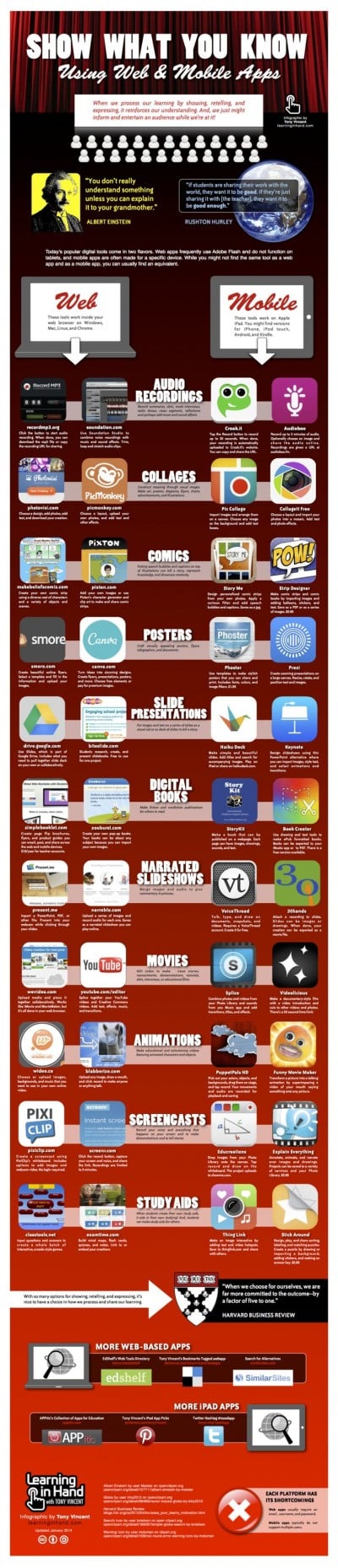
This week features an extremely useful infographic created by the amazing Tony Vincent, edtech guru and author of theLearning in Hand web site, and it goes something like this…
With a myriad of web tools and apps available to teachers, it’s sometimes mind-boggling trying to identify which are the most effective for the classroom. But if you’re looking for some innovative ways to showcase student work, here’s an awesome visual collection of resources spanning 11 categories—audio recordings, collages, comics, posters, slides, digital books, narrated slideshows, movies, animations, screen casts and study aids—to help get you started!
showcaseideas
Click here for a larger version of this infographic as well as a pdf that can be printed and/or to view the info on Scribd.
Classroom Connection:
Use the visual to discover resources that best suit your students’ needs.

Monday, May 2, 2016

Nearly 100 TED-Ed Lessons About Nature

From Richard Byrne at Free Technology 4 Teachers:

In recent weeks I have featured some neat National Geographic videos about cool things in nature like birds that eat dirt and animal migrations in Yellowstone. While those videos are great, they are a bit short. For longer lessons about interesting things in nature, take a look at the TED-ED playlist called Awesome Nature.

96 videos are included in the Awesome Nature playlist. The latest addition to the playlist attempts to explain the odd behaviors of domesticated cats.