|
Wednesday, October 21, 2015
Google For Education: Back To School Tips and Tricks


 Computer Science & Google, all together- Now you can see Google’s tools and programs for computer science education all in one place.
  Let your voice do the heavy lifting- Google Docs gets an upgrade with

 Easy charts & insights-
Monday, October 19, 2015
Tech It Up Tuesday: The LIFE Photo Archive & Document Analysis Worksheets
From EduTech for Teachers

Are you ready for another round of Tech It Up Tuesday, a series devoted to sharing an edtech tool, app, site or other resource that can be utilized in the classroom setting? This week’s shout out goes to theLIFE Photo Archive powered by Google, a collection of unpublished historical images from LIFE Magazine that span from the 1750’s to present-day.
This database containing millions of images—a joint venture between LIFE Magazine and Google—is completely free and very simple to use. Just access the site and then select a category of photos to browse (decades, people, places, events, etc.) or use the search option to locate the desired image. Once a photo is found, it can be downloaded to your device and utilized in multimedia projects, documents, presentations, etc.—so long as it has an educational/non-commercial use.
Here’s an example of one of the really cool never seen before images I found after conducting a search using the key words John F. Kennedy.
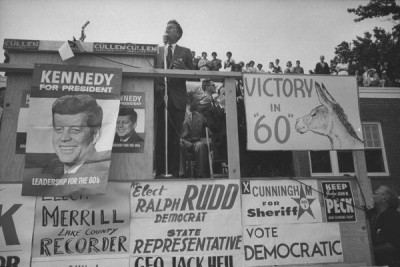
If you would just prefer to use the Google Images search engine to locate photos from the LIFE Photo Archive, then you can bypass the actual site by simply adding “source:life” to any search. The result? Only images located within the LIFE Photo Archive will be returned. (i.e. John F. Kennedy source:life). Give this advance search option a test drive!
Classroom Connection:
The LIFE Photo Archive is a great place to snag images that can be used for a variety of purposes: To introduce a historical topic and/or to spark a conversation about an event in history. These photos (or any photo as well as other media types) could also be utilized in conjunction with document analysis worksheets. Besides strengthening visual literacy, this concept is a great tool for use as bell ringers, pair share activities and exit tickets—all of which help to ensure that students are actively engaged with lesson content.
Examples of Document Analysis Worksheets:
Written Document (PDF) (HTML version)
Photograph (PDF) (HTML version)
Cartoon (PDF) (HTML version)
Poster (PDF) (HTML version)
Map (PDF) (HTML version)
Artifact (PDF) (HTML version)
Motion Picture (PDF) (HTML version)
Sound Recording (PDF) (HTML version)
The document analysis worksheets listed above were designed and developed by the Education Staff of the National Archives and Records Administration. You may find these resources to be valuable classroom tools as the use of images combined with instructional strategies and/or technology can…
Spark interest and enthusiasm
Engage the learner
Provoke thought
Provide clarity
Encourage interaction
Stimulate discussion
Make connections to learning
Address the four lenses of learning (meaning-centered, language-based, human, social)
Enhance critical thinking skills
Inspire creativity
Strengthen literacy, including information and visual
Promote a variety of 21st Century skills
And the best part: Lessons, activities and projects using images can be designed and utilized in all content areas across the K-12 curriculum!
Are you ready for another round of Tech It Up Tuesday, a series devoted to sharing an edtech tool, app, site or other resource that can be utilized in the classroom setting? This week’s shout out goes to theLIFE Photo Archive powered by Google, a collection of unpublished historical images from LIFE Magazine that span from the 1750’s to present-day.
This database containing millions of images—a joint venture between LIFE Magazine and Google—is completely free and very simple to use. Just access the site and then select a category of photos to browse (decades, people, places, events, etc.) or use the search option to locate the desired image. Once a photo is found, it can be downloaded to your device and utilized in multimedia projects, documents, presentations, etc.—so long as it has an educational/non-commercial use.
Here’s an example of one of the really cool never seen before images I found after conducting a search using the key words John F. Kennedy.
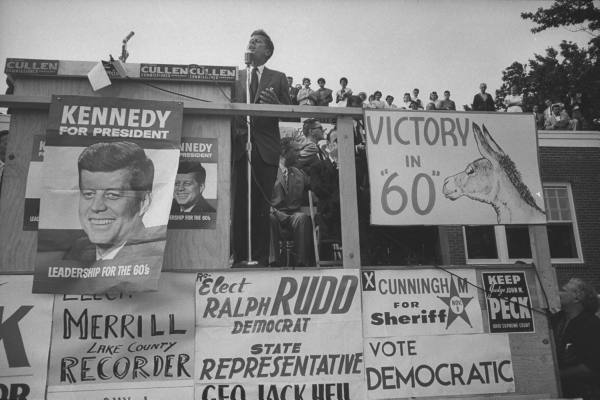
If you would just prefer to use the Google Images search engine to locate photos from the LIFE Photo Archive, then you can bypass the actual site by simply adding “source:life” to any search. The result? Only images located within the LIFE Photo Archive will be returned. (i.e. John F. Kennedy source:life). Give this advance search option a test drive!
Classroom Connection:
The LIFE Photo Archive is a great place to snag images that can be used for a variety of purposes: To introduce a historical topic and/or to spark a conversation about an event in history. These photos (or any photo as well as other media types) could also be utilized in conjunction with document analysis worksheets. Besides strengthening visual literacy, this concept is a great tool for use as bell ringers, pair share activities and exit tickets—all of which help to ensure that students are actively engaged with lesson content.
Examples of Document Analysis Worksheets:
Written Document (PDF) (HTML version)
Photograph (PDF) (HTML version)
Cartoon (PDF) (HTML version)
Poster (PDF) (HTML version)
Map (PDF) (HTML version)
Artifact (PDF) (HTML version)
Motion Picture (PDF) (HTML version)
Sound Recording (PDF) (HTML version)
The document analysis worksheets listed above were designed and developed by the Education Staff of the National Archives and Records Administration. You may find these resources to be valuable classroom tools as the use of images combined with instructional strategies and/or technology can…
Spark interest and enthusiasm
Engage the learner
Provoke thought
Provide clarity
Encourage interaction
Stimulate discussion
Make connections to learning
Address the four lenses of learning (meaning-centered, language-based, human, social)
Enhance critical thinking skills
Inspire creativity
Strengthen literacy, including information and visual
Promote a variety of 21st Century skills
And the best part: Lessons, activities and projects using images can be designed and utilized in all content areas across the K-12 curriculum!
Try EDpuzzle's Chrome Extension to Save Videos for Flipped Lessons
from Free Technology for Teachers

For those who haven't tried EDpuzzle, it is a nice tool for building flipped video lessons. You can insert into saved videos your own voice comments and text comments. You can also create a series of questions to go along with your chosen video. Questions are inserted along a timeline that matches the video. That means that your students don't have to wait until the end of a video in order to answer the questions you've created.

Applications for Education
EDpuzzle can be a good tool to use to create short review videos or flipped lessons for your students. You can also have students use EdPuzzle to annotate videos by pointing out important aspects of videos by using the voice comments option and or the question building option.
Friday, October 16, 2015
20 ideas for solid student blogging from Ditch That Textbook

They are expert digital collaborators, connecting with others to discuss topics near and dear to their hearts.
That’s why I had them start blogging this year. Theirs is an online world, and I want them to be there when they engage with my content.
It’s a work in progress, and I’ll do it much differently next year than I did in this inaugural year. But I like the connections they make with each other when they blog and do it well.
After a year of experience and absorption of as many student blogging articles/chat comments/podcasts as possible, here are 20 things to consider:
1. Write about class and more: Connections to and opinions about class content are great, especially if students discuss via comments. But we’re missing a great opportunity if we limit it to that. Kids don’t automatically reflect on their lives and what’s important to them. Their blog in your class may be their only opportunity.
2. Open topic posts are good: Richard Byrne of Free Tech for Teachers recently suggested that students reflect on what they’ve learned that week in a simple blog post. It could be open to all classes or just from your content area.
3. Go to their world: So what do they write about? Try to meet students in their world as much as possible. Making content touch their own lives is a connection that can last a lifetime. Pop culture, music, sports, etc. Listen to what they talk about in class. Example: How does one of their relationships mirror the relationship that two characters from your class have?
4. Let students pick: Open the floor for writing prompt suggestions. You might be surprised at the kinds of creative, relevant connections they make.
5. Teamwork works: Encourage students to connect with each other in their posts to make them more personal, and not just in the comments they leave. Q&A interviews and polls work well.
6. Do your homework: Encourage (or require) students to link facts in their posts to real-world sources. Hyperlink webpages. Cite hard-copy texts. Use direct quotes when citing a classmate’s opinion.
7. Encourage readability: Good blog writing crosses over from the “real world” to the classroom. Catchy introductions. A “what’s it about” paragraph early on. Bullet points and lists. Short paragraphs. Simple sentences. Conclusions with questions.
8. Reward out-of-class blogging: I believe in making student blogs a place where students want to go at home and on the go. I’m interested in trying incentives for after-hours activity (i.e. extra points/privileges, polls/games for interest, etc.) Real-time blog responses to events (i.e. school activities, news, etc.) can do this.
9. It takes time: I’ve found that rushing students to write and comment leads to shallow content. A little time can encourage a great digital conversation.
10. Emphasize clean copy: Online writing doesn’t mean text-messaging writing conventions, and some students might miss that point if you don’t bring it up. Solid spelling, grammar and idea development gives them credibility in the eyes of their readers.
11. But don’t nitpick: Avoid the temptation to correct every spelling and grammar error. Real-life blog readers don’t do that (not much at least!). Plus, it discourages their creativity and initiative. If a spelling/grammar pattern emerges, consider addressing it privately.
[RELATED: 6 reasons why I’m starting a teacher blog — and why you should, too]
12. Good comments are key: Well-thought-out comments are online conversation jewels. Good ones add ideas/information to the discussion, insert personal experiences, provide insightful links/quotes, ask follow-up questions, etc.
13. Choose a stance on comments: I can see two schools of thought on comments: quantitative and qualitative. The quantitative stance has countable requirements (comments, words, etc.). It can assure participation but promotes an “I have to” mentality. The qualitative stance values quality of discussion over quantity but may result in less participation. A mix of both may be the best option.
14. Create respect: The lack of face-to-face communication in online discussions makes it easy to forget that real people actually read what we write. Students can become brazen with harsh comments if they don’t remember the peers they’re addressing. Civility should rule.
15. High-five good work: Find ways to promote quality blog posts and comments outside of the student blog. Mention them or post them in class. Add them to the class webpage. Include them in school newsletters. The sky is the limit.
16. Decide on privacy: Public student blogs can open children to the harshness and dangers of the real world, but they offer an authentic, global audience. Students thrive on outside-of-school comments. Link to student blog posts on Twitter with the #comments4kids hashtag to open them to a huge worldwide audience.
17. Find a medium: There are plenty of potential homes for your students’ blogs. Richard Byrne lists several in this post. They range from the basic (Kidblog, Edublogs, Blogger) to the complex (self-hosted WordPress).
18. Break the economic barrier: Students without home Internet access are at a disadvantage. Help them find Internet time in school (study hall, library time, computer lab time, before/after school time) or out of school (at a library, a friend’s house, etc.). A phone call or e-mail to a parent could uncover the answer.
19. Cumulative products are good: Find an end-of-the-year product students can create using their blog posts. They could create a book (print or PDF ebook), derive a Weebly website, compile a top-10 list of posts or comments.
20. Reflection is good, too: When students look over their work for a year, they can see how they’ve grown as a writer, a learner and a person. They relearn important lessons. They combat the “I didn’t learn anything in that class” mindset.
Thursday, October 15, 2015
Instagram in the Classroom
Three Examples of Using Instagram in K-12 Settings
From Free Technology for Teachers

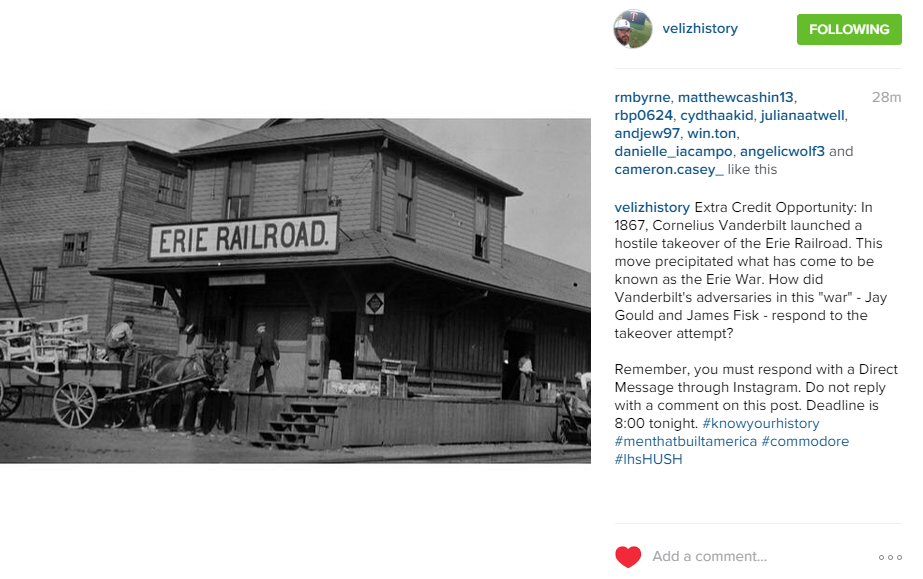
Stephen Veliz is a history teacher that I have followed on Instagram for more than a year. I'm drawn to his account because during the school year he posts some great history questions for his students. The questions are, obviously, connected to a picture. Students can earn extra credit for answering the questions correctly. Below you will see a screenshot of one of Stephen's recent posts for students.
 |
| Click image to view full size. |
Goose Creek Consolidated Independent School District's tech department has an Instagram account that showcases the work they're doing to support teachers and students. I particularly like this post from earlier this fall in which they're encouraging teachers to build websites with Weebly.
Tuesday, September 22, 2015
Finding Virtual Guests for the Classroom
From Matt at Ditch That Textbook:
5. Ask friends, family and co-workers – The perfect virtual guest may be as easy to find as sending a quick email or social media message to people you know. They don’t have to be a perfect fit for your content area, either. Some creative thinking could come up with ties into your class content. Plus, the experience may be as worthwhile (or more!) than the content facts your students could learn.
Today, I’m going to make it even more accessible. The big question I’m always asked when I present at workshops or conferences is this: How do I find people to video chat with in my class?
Plenty of resources are available for any educator of any grade level or specialization. Here are some examples:
1. Check out the lessons on the Skype in the Classroom site (education.skype.com) –This is where I started when I was a video chat newbie wanting to get my classes connected. TheSkype in the Classroom site is a virtual bulletin board where teachers post lessons they’d like to create with others around the world. Museums and other organizations — as well as quality guest speakers — create lessons offering to connect with your classroom. It’s worth checking out to see if anything sparks your interest.
2. Create a lesson on the Skype in the Classroom site – If you don’t see exactly what you want to do, post a lesson on the Skype in the Classroom site and recruit others. Describe the lesson, choose the audience you want and submit it. You may be surprised at who volunteers to join your lesson!
3. Contact the creator of a Skype in the Classroom lesson – This is how I made my best video chat experience a reality. I found a lesson that was kind of what I wanted to do. Then, I asked the teacher if she would modify it to make it more like the experience I hoped for. She agreed and it was great! Use this great website not only as a virtual lesson plan enhancer but a list of contacts who can help you.
4. Send a simple email – We’re all well versed in our content area. With a little brainstorming, we could generate a list of the kinds of people that could bring value to our students via Skype,Google Hangouts, FaceTime or others. It never hurts to do some Googling to find examples of those people and send a simple email. Here’s an example. Are you reading a book with your class? Is the author is alive? If so, it can’t hurt to reach out to the author for a video chat meet-up. Even if it’s a short one, it can be a very memorable (maybe life-changing!) experience for students.
Here’s an example: A student in a fifth/sixth-grade school sent a letter to Shaquille O’Neal asking for a simple autograph. What he got was a letter from Shaq saying that he would Skype with the student’s school instead! His words of inspiration were certainly powerful to students in fifth and sixth grade. See the Skype call here:
5. Ask friends, family and co-workers – The perfect virtual guest may be as easy to find as sending a quick email or social media message to people you know. They don’t have to be a perfect fit for your content area, either. Some creative thinking could come up with ties into your class content. Plus, the experience may be as worthwhile (or more!) than the content facts your students could learn.
6. Utilize Google Plus communities – Lots of enthusiastic, globally-minded educators are part of communities on Google Plus. (Google Plus is a social media network … I think of it as Google’s version of Facebook.) Go to Google Plus (hint: If you have a Google account, you already have access to Google Plus!). Check out any of the following communities (or others!). Post a message and ask the community for what you’re looking for and see what you come up with. Post in multiple communities — it’s like putting multiple fishing lines in the water to maximize your chances of catching a fish.
7. Twitter – If you’re not using Twitter professionally yet, what are you waiting for??? (Start with my page for getting started on Twitter.) By tweeting your requests and including the right Twitter users and hashtags, you can reach a large audience of the right kinds of people who want to help. Find the right hashtags (i.e. searchable categories) on this list of Twitter chats. Twitter accounts like Skype Classroom will often retweet your requests to its tens of thousands of Twitter followers!
8. Nepris – This site connects teachers with industry experts virtually to bring curriculum topics to life and help mentor and evaluate student projects. Use their connections and expertise to find the right virtual guest for your classroom.
9. Ask me! – I know a lot of smart people who have expertise in connecting with experts and other classrooms around the world. Between you and I, we should be able to find someone who can help. Shoot me an email or a message on Twitter and I’ll do my best!
Wednesday, August 26, 2015
One More Day (Les Miserable) for Teachers
Subscribe to:
Posts (Atom)